

We have completed the platform upgrade and migrated to AlmaLinux 9.6. In this regard, we would like to draw your attention to several changes:
- New queues for HybriLIT and Govorun;
- The Lmod module system is now used instead of Modules;
- User home directories have changed:
• /zfs/store5.hydra.local/user/l/login — the user home directory, intended for file editing, building, and compiling programs.
• /lustre/projects/l/login — the user directory for running computations, data storage, and data processing. - The recommended workflow for working on the platform is described here.
We also inform you that file copying from the previous storage to your current directory /lustre/projects/l/login is still in progress. This process may take some time. Please do not worry — all your data are safe and will be fully transferred. In addition, updated versions of application software packages have been installed on the platform. If you require additional software, please submit a request here.
Recommended Steps for Working on the HybriLIT Platform
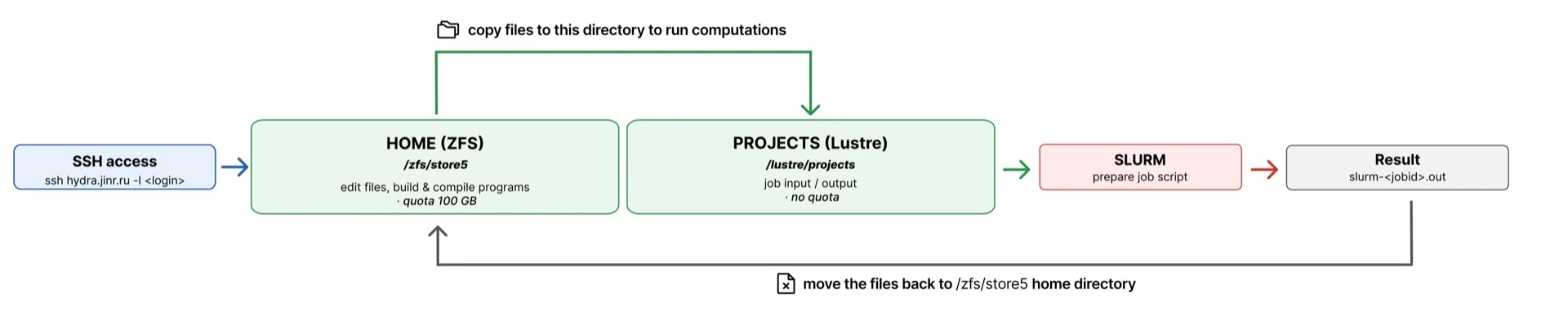
 A typical workflow on the platform consists of several steps: connecting to the cluster, preparing files in your home directory, copying data to the project filesystem for computations, running jobs via SLURM, and saving results.
Workflow Steps
- Connecting to the Platform
Connect to the cluster via SSH:ssh hydra.jinr.ru -l <login> After logging in, you will be in your home directory.
 - Working in the Home Directory (HOME, ZFS)
Path:/zfs/store5.hydra.local/user/l/login/Purpose:
The home directory is intended for:
• Editing source files
• Building and compiling programs
• Storing configuration files
• Preparing scripts for job submissionQuota: 100 GB
Home directory is not intended to run computations and isn’t available on the platform’s computing nodes. - Loading Software via Lmod
 The platform uses the Lmod module system to manage software.
To see available programs:module avail
To load a module:module load <module_name>
To load a module:
module load <module_name> Example:
module load gccmodule load openmpi After loading the necessary modules, you can compile programs or prepare the environment for job execution. -
Copying Files to the Project Filesystem (PROJECTS, Lustre)
Before running computations, it is recommended to copy data and scripts to the project filesystem: /lustre/projects/l/login/Purpose: This filesystem is intended for:
• Job input data
• Intermediate files
• Computation resultsIt is optimized for parallel I/O and running computational tasks.
Quota: No quota is set for users.
Example of copying files: cp input.dat /lustre/projects/l/login/ - Running Jobs via SLURM To run computations, prepare a SLURM job script and submit it to the queue.
Submitting a job:sbatch job.sh The SLURM scheduler will allocate the job to the compute nodes of the cluster. - Retrieving Results
After the job completes, an output file will appear in the working directory:slurm-<jobid>.out All files created by your program will also be located in the project directory. -
Copying Results Back to HOME
Important results should be copied back to your home directory for storage or further processing:cp results.dat /zfs/store5.hydra.local/user/l/login/